Real Capture Dates
Use original EXIF timestamps instead of relying only on file dates.
Turn thousands of scattered pictures into a neatly organized photo collection.
Use original EXIF capture dates. Choose your folder structure. Preview everything before moving or copying your photos.
Free to use · Move or copy · Preview before organizing
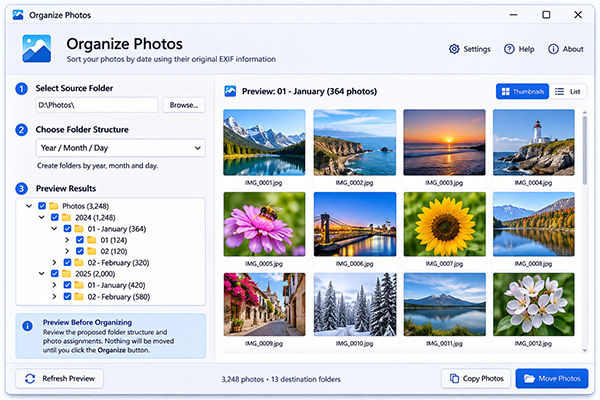
Use original EXIF timestamps instead of relying only on file dates.
Choose the folder structure that suits your collection - year, month, and day.
Inspect the proposed folders and photo assignments before taking action.
Preview the proposed folder structure and photo assignments before making any changes. Adjust your settings and preview again until everything looks right.
Organize with confidenceIllustrative example - the actual preview depends on your selected photos and settings.
Choose how deeply to organize your collection. Keep everything grouped by year, split it into months, or create a folder for each day.
Move photos into their new folders, or create an organized copy while keeping the originals where they are.
Organize Photos prioritizes the original EXIF date and time. When EXIF capture information is unavailable, configure an alternative date source.
Choose the folders containing the pictures you want to organize.
Select your folder structure and date source, then inspect the proposed results.
When everything looks right, choose how to organize your photo collection.
Bring order to your photo collection with a straightforward Windows utility.
Yes. Organize Photos is completely free to use.
It prioritizes the original EXIF capture date and time. You can configure alternative date sources for photos without usable EXIF capture information.
Yes. Choose the folder levels that suit your collection, including year, month, and day combinations.
Yes. Preview the proposed destination folders and photo assignments before moving or copying files.
Yes. Choose Copy to create an organized copy while leaving your original files in place. You can also choose Move.
Organize Photos is designed for Windows.